Figured Integrations
It’s about time to save time. With Killsheets Automation, Figured uses AI to automatically read your meat invoices and reconcile livestock sales straight into your tracker — and Xero. AFFCO, Silver Fern Farms, ANZCO, and Alliance supported.
About Killsheets Automation
Between them, AFFCO, Silver Fern Farms, ANZCO, and Alliance handle the majority of the country’s livestock kill, covering most of the killsheets a livestock-heavy practice will see in a season.
Managing meat invoices can be complex and time consuming, especially for farmers keeping track of multiple transactions and livestock numbers. With Figured’s AI-powered killsheets integration, we’re changing that.

"Even if we automate the rest of the farm financials, killsheets still need to be typed up twice."
Retyping killsheets isn’t glamorous work, but it’s part of the job. The data needs to find its way into the accounts, and into Figured’s Livestock Tracker, on every kill, for every farm, all season.
Except, by the time each invoice comes in, the processor has already worked out the grades, weights, levies, and the payment. The data is there, it just needs to be duplicated. So what’s stopping that from being automated too?
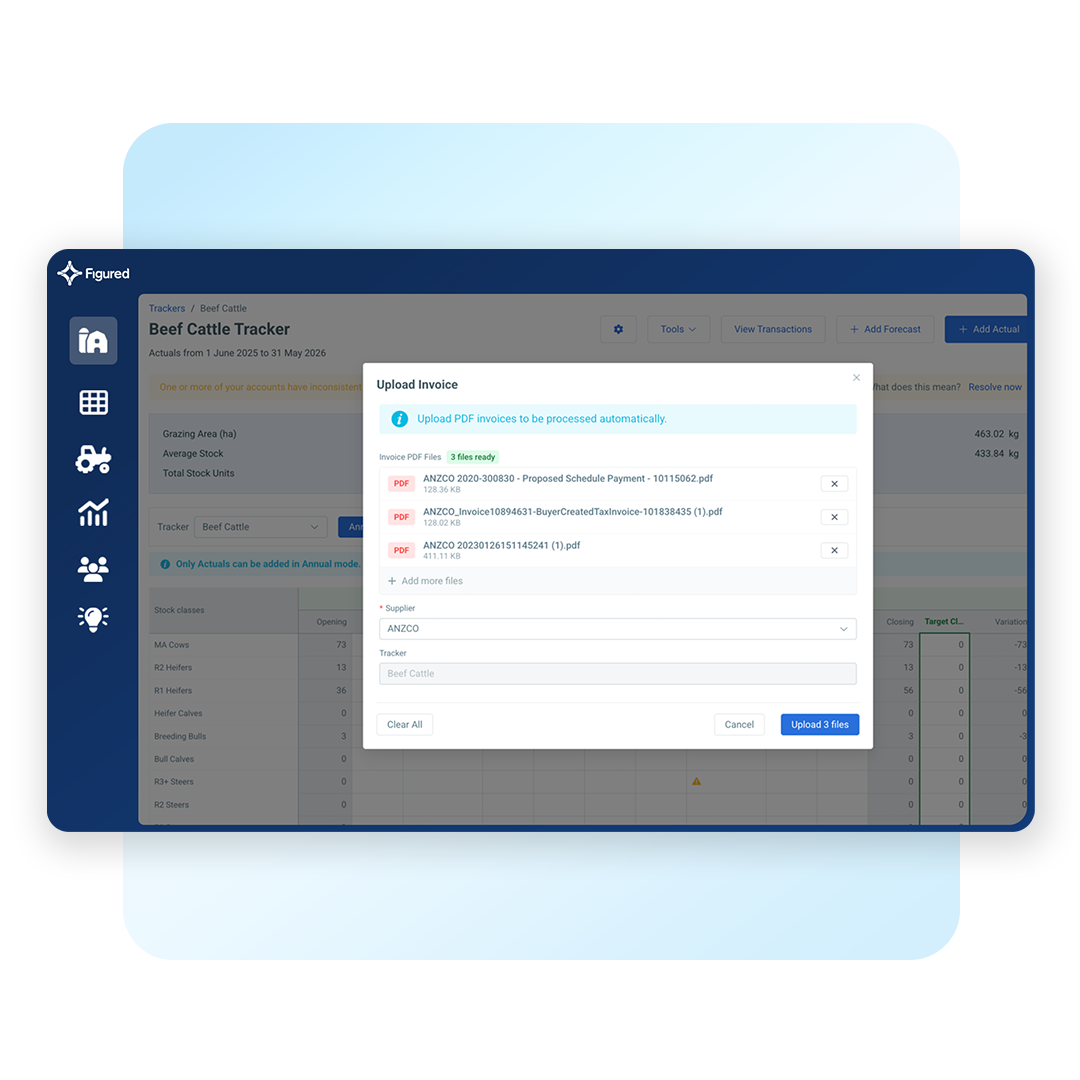
Figured’s AI reads the killsheet PDF the moment it lands in Figured, whether your processor sent it through automatically or you uploaded it yourself. It picks out animal grades, weights, and levies without anyone re-keying a number, so what used to take around 20 minutes of manual entry per invoice now takes about a minute to check and approve.
Approve the invoice once, and Figured posts a matching invoice to Xero while creating the stock movement in your Livestock Tracker at the same time. There’s no second pass to keep the two in sync.
Authorise Figured against a supply number for AFFCO or Silver Fern Farms, and future killsheets route straight to the right Livestock Tracker on their own. If your stock goes to ANZCO or Alliance, or you’d rather not wait on an authorisation, upload the PDF yourself for any of the four instead.
Setup
Setting up authorisation for AFFCO and Silver Fern Farms doesn’t take long. For manual upload, there’s no setup required at all.
Step 1
Download, sign, and upload the authorisation form for AFFCO or Silver Fern Farms, with your supply number.
Step 2
Figured contacts your supplier to activate the connection using the details you’ve provided.
Step 3
Killsheets arrive and sit alongside Figured’s pre-filled transaction, ready for a quick check before approval.
Need help getting set up?
View the Full GuideNow with Figured, it has absolutely shifted our whole outlook on the business. I just can’t wait to be using the reports to analyse and approve decisions — we’ve never had time to do that before, we’ve been too busy just getting the information.
I didn’t have a lot of confidence in my spreadsheet and my formulas. Whereas with Figured, I know they’re all over that. It gives me a lot more confidence to know that the actual figures being pulled through are correct — and they’re getting pulled through in real time.
If you’re not measuring what you’re doing, you can’t manage it. And Figured has certainly given us a greater ability to manage things, because we are measuring so much more.
If something looks off between the killsheet invoice and what’s showing on the review screen, don’t approve it — contact Figured support straight away so it can be looked into before it’s posted. If you’ve already approved a transaction and spot an error afterwards, you can delete the saved transaction, which puts the invoice back into the Review tab so you can go through it again.
If you’d rather not reconcile a particular invoice at all, you can dismiss it from the Pending view instead of approving it.
For AFFCO and Silver Fern Farms, setup only takes a few minutes. Simply download the authorisation form from Settings > Operations > Killsheet Authorisation, fill it in with your supply number, and upload it. From there, it typically takes 1–2 working days for your processor to set things up on their end so Figured is included on your invoice emails.
Once that’s done, Figured checks for new killsheet emails on an hourly basis, so a new invoice can take up to an hour to appear for review. Only invoices sent after your authorisation is approved come through — historical invoices aren’t included.
Don’t want to wait? Upload meat invoices from any of the four supported processors at any point, without any setup authorisation required.
Figured Killsheets Automation currently supports integration setup with AFFCO and Silver Fern Farms to receive meat invoices automatically. Or, upload manually from either processor plus ANZCO and Alliance.
If you use an alternative meat processor than these four, you can still manually input the data into the Livestock Tracker.
Yes. Just open the invoice you want to see and you can view or download the PDF from there — whether it’s still pending or already approved. If you want to keep a permanent record alongside your accounting software, you can also attach the downloaded PDF to the corresponding transaction in Xero.
Anyone with edit access to Figured can upload killsheets, or authorise the integration.
More integrations

Farm Management
Record on-farm events in Trev and see them reflected in your Figured reporting.
Learn More
Farm Management
Bring livestock and production data from AgriWebb into your Figured budgets automatically.
Learn More
Farm Management
Track individual animal performance in FarmIQ, feeding straight into your Figured tracker.
Learn More
Accounting
Sync your farm’s accounting data with Figured automatically, and add livestock, production, and reporting on top.
Learn More